How to Get Leads on LinkedIn: Your Simple Guide

Your LinkedIn page is like your first handshake. Before you even say hi or post anything, people are checking you out. So, what do they see?
Most people make their page look like a boring old resume. That's a big no-no. Your page needs to be like a magnet for the people you want to help. It’s your online shop, and it needs to be interesting enough to make your perfect customer stop scrolling and look closer.
If your page doesn't instantly say "I can fix your problem," they'll just leave. It's really that simple. A great profile does the hard work for you, all day, every day, turning people who are just looking into people who want to talk.
Turn Your LinkedIn Page Into a People Magnet
Let's get this straight. Your page isn't really about you. It’s about them—the people who might become your customers. Every part of it should answer their secret questions and show them they’ve found the perfect person.
It's like taking them on a little three-step trip: from your headline, to your story, and then to your proof.
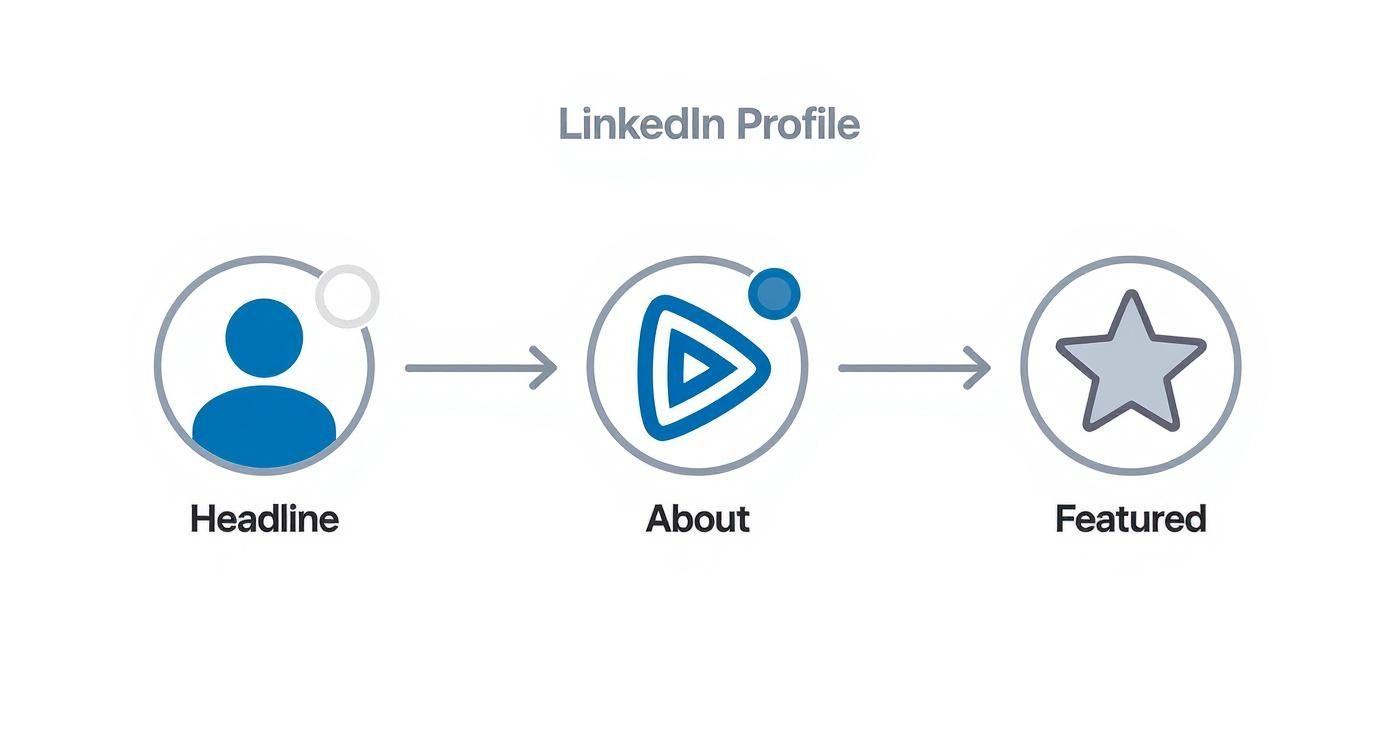
Each part builds on the next. It takes a total stranger from "Who's this?" to "Wow, I need to talk to them."
Your Headline Is More Than Just Your Job Title
That tiny line of words under your name is super important. Don't waste it with "Boss at My Company" or "Sales Person." Who cares?
What people do care about is what you can do for them. Your headline should be like a tiny commercial that tells the right people "Hey, look over here!" Think of it like a big sign on the highway. Who do you help, and what amazing thing do you help them do?
Instead of "Marketing Helper," try "I Help New Shops Get Their First 100 Customers." See? One is just a label. The other is a promise. It makes the right person stop and think, "Hey, that's me!"
A great headline is:
- For a certain group: It calls out to specific people.
- About a result: It talks about the awesome change you make.
- Super clear: No big, confusing words.
"Your LinkedIn headline isn't about your job title; it's about their problem. Stop talking about what you are and start talking about what you do for people. You'll get way better conversations started."
Get this part right, and you're halfway there. It's the hook that gets them to look at the rest of your page.
Tell a Story in Your About Part
Okay, they liked your headline. Now what? The 'About' section is where you really make a friend. This isn't where you just copy your resume. It's your chance to tell a story.
Talk right to your perfect customer. Show them you get their problems because you've had them too. Use their words. If you help people with money, don't just say you "manage money." Talk about how business owners can't sleep because they worry about money, or how annoying it is to figure out taxes.
When people feel like you understand them, they start to trust you. And trust is the most important thing.
This website is super powerful. It's not just for fun; it's where real work stuff happens. Did you know 122 million people got interviews through LinkedIn? And 35.5 million got hired because of someone they met here. That shows people are here to make big moves. For more cool numbers, Kinsta has a great breakdown.
Show Off Your Best Stuff
Last, the 'Featured' section is where you show your proof. You made a promise with your headline and made a friend with your story. Now it's time to show them you're the real deal.
Think of this like your greatest hits collection. Pin your best article, a link to a cool project on your website, a video of a happy customer, or a free guide.
This is your chance to give something helpful before you ask for anything. When someone reads your headline, likes your story, and then sees real proof that you know your stuff, talking to you becomes the obvious next step. It makes the whole picture make sense, turning a curious visitor into someone who's excited to talk business.
Find Your Best Customers on LinkedIn
If you try to sell to everybody on LinkedIn, it’s like yelling in a storm. You’ll make a lot of noise, but nobody will hear you. To actually get people interested, you have to stop shouting and start looking for the right people, very carefully.
Think of yourself like a detective. Your job is to find the exact people who have a problem that you can fix.
This isn't about guessing. It's about knowing exactly who you're looking for. LinkedIn's search tools are like magic, but most people only know the easy tricks. We're going to learn the secret ones.
First, Draw a Picture of Your Perfect Customer
Before you even type in the search box, you need a super clear picture of who you want to find. This is your Perfect Customer Picture, and it's more than just their job. It's a drawing with words of the person who gets the most help from what you do.
What makes them grumpy every day? What big goals are they trying to reach? What's the one problem that wakes them up at night? When you know these things, you can stop sounding like a salesperson and start sounding like a helper.
Let's say you help small tech companies with marketing. Your Perfect Customer isn't just "business owners." It's more like this:
- Job: Founder or CEO
- Company Size: Less than 20 people
- What they do: Make software
- Biggest Problem: "We made a great thing, but nobody knows about it."
- Big Dream: Get their first 100 paying customers.
See? Now you’re not just looking for a job title. You're looking for the boss of a small software company who feels invisible. That’s a person you can have a real chat with.
Use LinkedIn’s Search Filters Like a Pro
Once you have your Perfect Customer Picture, LinkedIn's search tools become your secret power. The real magic is hidden in the special filters. This is how you go from finding thousands of okay people to finding hundreds of perfect people.
You can stack filters on top of each other to find exactly who you need. For example, you could search for "Marketing Directors" at companies with "51-200 workers" in the "Money Services" business, who live near "Chicago." This much detail means every person you find is a really good match.
The magic of LinkedIn isn't just that it's huge. It's that it can help you find a special person in a giant crowd. With the right filters, you can find the bosses who need you most. It turns a loud, messy place into your own list of future customers.
This is how you stop wasting time and start having real business talks. The numbers show this works, too. LinkedIn is amazing for business-to-business stuff. It's 277% better at getting leads than other big websites. If you like numbers, HubSpot published a great analysis on why it's so good.
Find Awesome Leads Inside LinkedIn Groups
Last, here's a secret goldmine that most people don't use: LinkedIn Groups. These are like online clubs where your perfect customers are already hanging out and talking about the same problems you solve.
Look for groups about your type of work, or even better, your customer's type of work. Join a few busy ones and just listen for a while. What questions do people keep asking? What are they complaining about?
This is where you can step in. Join the conversation and be truly helpful. Answer a question. Share something useful. Give a new idea. Don’t try to sell anything. Just help out.
When you do this over and over, people start to trust you. You become a friendly, helpful face. So when you finally send a request to connect, it’s not from a stranger. It's from someone they already know and see as a helper.
Make Posts That Bring People to You
Think about the last time you bought something because a loud commercial yelled at you. Probably never, right? It's the same on LinkedIn. The biggest mistake people make is trying to sell, sell, sell in every post.
The real secret to getting leads is to stop selling and start helping.
Your posts are your chance to show people you know your stuff by actually being useful. It's how you build trust, one post at a time. When people see you as the expert who gives away awesome advice for free, they’ll be waiting in line to pay you when they need real help.
This isn't about trying to make one post go crazy famous. It's about always being generous with what you know. This is how you turn your LinkedIn page into a machine that brings in great leads for you, all day, every day.
Give Them What They Really Want
Before you write anything, you have to get inside your customers' heads. What are the secret questions they type into Google late at night? What problems do they complain about to their friends at work?
Your posts need to be the answer to those questions.
Don't just guess. Go back to that "perfect customer" picture you made. What are their biggest headaches? What are the most annoying things that slow them down?
Let's pretend you help small business owners with their money. Instead of a boring post like "5 Reasons to Hire a Money Helper," make posts about their real worries:
- A short text post asking, "What's the one money task you hate doing every single month?"
- A quick video showing a simple trick to organize bills using just their phone.
- A helpful list of tax breaks that most freelancers forget about.
See the difference? Each of these posts solves a real, annoying problem. You’re not trying to sell your services; you’re giving them help right away. That’s what makes people stop scrolling, look closer, and remember your name.
The goal of your post isn't to get a "like." It's to make someone think, "Wow, that was really helpful. I should follow this person." Every helpful post is like putting a little bit of trust in a trust bank that you can use later.
Mix Up Your Posts to Keep It Fun
Eating the same food every day is boring. Your LinkedIn posts are the same way. To keep people interested and coming back, you need to share different kinds of posts that teach, entertain, and make them think.
Some days, a simple text post with a good question is all you need to start a great chat. Other times, a picture or video works way better. The facts are clear: business marketers love LinkedIn. 97% of them use it for their posts. And when it comes to getting seen, video is the best—it's 20 times more likely to be shared than other kinds of posts. You can explore more amazing LinkedIn stats to see how powerful different posts can be.
Here are a few types of posts I suggest you mix into your week:
- Text-Only Posts: Great for sharing a quick tip, a strong idea, or a question. They are super easy to read and often start the best chats in the comments.
- Carousel Posts (PDFs): These are like little slide shows. You can explain a big idea in simple, easy-to-read slides with pictures. They are awesome for teaching how to do something.
- Video: Don't make it complicated! A simple one-minute video you shoot on your phone, where you share one good tip, can feel very personal and build a strong connection.
- Polls: An easy, fun way to get people to click and share their opinion. Use them to learn about what your customers are struggling with or to get ideas on a popular topic.
Make a Simple Posting Plan
Being consistent is more important than being perfect. You don't have to post three times a day. You just need to show up regularly so people know they can count on you for good stuff.
A simple plan can make a huge difference. Following a plan takes away the daily stress of "What should I post?" and makes sure you have a good mix of posts that help your audience and make you look like an expert. This plan is key to any good idea for how to generate leads on LinkedIn.
Here's an example plan to help you stay on track. It mixes different kinds of helpful posts to keep people interested and bring in new leads.
A Simple LinkedIn Weekly Post Plan
| Day | Post Type | Goal |
|---|---|---|
| Monday | Interesting Question (Text) | Start a conversation and learn what your audience thinks. |
| Tuesday | "How-To" Carousel | Teach a simple task and show you're an expert. |
| Wednesday | Quick Tip Video (1-2 min) | Share a helpful shortcut or idea, making a personal connection. |
| Thursday | Industry Poll | Get easy clicks and learn about your market. |
| Friday | Success Story / Insight | Share a customer success or a personal lesson to build trust. |
This isn't a strict rule, just a place to start. The important thing is to find a rhythm that works for you and stick to it. Even posting just 3-4 times a week will put you way ahead of most people on the site.
Connect With People Without Being Weird
This is where everything either works perfectly... or fails completely. You can have a shiny profile, a perfect map of who to talk to, and a page full of helpful posts. But if your first message sounds like a boring, copy-pasted sales ad, you'll be ignored. Super fast.
We’ve all gotten them. That plain, "I'd like to connect" message is like an empty room. It’s boring, it's not personal, and it gets you nowhere. The trick is to stop thinking about what you want and start thinking about what they might find interesting.
It’s all about making a human connection first. One real conversation is worth a hundred ignored sales pitches. This is how you learn to reach out and start chats that actually go somewhere.
Writing a Connection Request That People Actually Accept
Think of your little note with the connection request as your first handshake. You only have a few words to make a good impression, so every word is important. The goal isn't to sell anything; it's just to give them a reason to click "Accept."
The easiest way to do this is to make it about them. Did they just share a cool article? Did you see them talk in a video? Do you know the same person or are you in the same LinkedIn Group? Mentioning one little thing shows you actually paid attention.
It proves you see them as a person, not just another name on a list.
Here’s what that looks like:
- Bad: "Hi John, I'd like to add you to my professional network."
- Good: "Hi John, I really liked your recent post about being productive. That idea about 'deep work' time was so true. I'd love to connect and see more of your ideas."
See the difference? The second one feels like a real compliment. It’s specific, it’s real, and it gives a clear reason for connecting without asking for anything.
The First Message After They Say Yes
Yay, they accepted! Now what? Don't mess it up. This is a big moment. You'll ruin everything if you immediately send a sales pitch. That's like asking someone to marry you on the first date.
Your first message should be a simple, friendly follow-up. Thank them for connecting and keep the conversation going. Your only job right now is to get a reply and start a real chat.
Let's stick with our example from before:
- You could say: "Thanks for connecting, John! I was curious, have you found any good apps that help your team protect that 'deep work' time? I'm always looking for new ideas."
This is a great message for a few reasons:
- It’s not pushy: You’re just asking a simple question.
- It shows you're curious: You actually want to hear their opinion.
- It’s easy to answer: They don't have to write a long, hard response.
This simple trick works surprisingly well. When you send messages the right way, you can get a huge 85% reply rate—that's more than three times better than most emails. To learn more about this, you can explore some more LinkedIn stats and facts.
"The goal of your first few messages isn't to get a meeting. It's to earn the next reply. Treat it like a real chat, not a sales plan. Find things you have in common, ask good questions, and be genuinely helpful. The business will come after the friendship."
Big Mistakes to Avoid When You Reach Out
Knowing what not to do is just as important as knowing what to do. The wrong message can get you ignored or even blocked. Here are the biggest things to avoid when you're trying to find leads on LinkedIn.
- Selling in the connection request: This is the fastest way to get your request ignored. Period.
- Pitching right after they connect: Give the new friendship some space to grow.
- Using a boring, copy-paste message: People can tell when you're being lazy.
- Making it all about you: Your message should be about them—their work, their posts, their problems—not your product.
- Asking for a meeting right away: Earn the right to ask for their time by being helpful first.
Think of it like making a new friend. You wouldn't walk up to a stranger at a party and immediately ask for a big favor. You'd find something you both like, have a nice chat, and get to know each other a little first. The same rules are true on LinkedIn. By being a helpful, interesting person, you'll stand out from all the noise and build a list of people who are actually happy to hear from you.
Grow Your Efforts with Simple Automation
Doing everything yourself is the best way to learn how things work. You get into a groove, you figure out which messages get replies, and you get a feel for talking to people. But once you have a system that works, doing it all by hand just slows you down.
It's time to let technology do some of the heavy lifting. I’m not talking about some confusing, expensive program that's hard to learn. The whole idea is to use simple tools that give you back lots of your time. Then you can focus on what's important—having real talks with people who are interested in you.
This is how you turn LinkedIn from a daily chore into a machine that brings in business, even when you’re busy. It’s all about working smarter, not harder.
Let Simple Tools Do the Boring Stuff
Imagine you had a helper who could send out those first connection requests and friendly follow-up messages for you. That’s what a good, simple automation tool does. It does the boring, repetitive jobs that take up your whole day.
This frees up your mind and your time. Instead of spending an hour clicking "connect," you can spend that hour talking to the people who already said they're interested. It's a huge change for how much you can get done.
Think about how it works:
- You find your perfect people using the search tricks we talked about.
- You write your great messages—the personal, helpful ones you know get replies.
- The tool does the sending for you on a schedule, just like you would, but you don't have to be there.
This way, your outreach just keeps going in the background. It’s like having a system that’s always planting seeds for future business chats.
"The reason to use automation isn't to get rid of human connection; it's to make more chances for it. By letting technology do the first step, you free yourself up to have better, realer conversations with the right people."
Use LinkedIn’s Own Tools to Make It Easy
LinkedIn has its own cool tools to help you get leads more easily. One of the best is Lead Gen Forms. If you ever decide to pay for LinkedIn ads, these forms are a lifesaver.
Instead of sending someone to a slow website where they have to type in all their info, a Lead Gen Form pops up right in LinkedIn. Even better, it automatically fills in their name, email, and company from their profile. All they have to do is click "submit."
This one simple thing makes a huge difference. LinkedIn's Lead Gen Forms have an average success rate of 13%. That’s more than five times higher than the usual 2.35% you get on websites. When it comes to getting leads, LinkedIn is a beast, doing 277% better than other big social media sites. You can discover more insights about LinkedIn's lead generation power to see just how well it works.
Keep an Eye on a Few Simple Numbers
So, how do you know if your new system is working? You don't need a confusing screen with a million charts. You just need to watch a few key numbers to see what’s going on.
Keeping track of these simple numbers will tell you everything you need to know. It shows you where your system is working well and where you might need to change something, like your connection message or the people you're talking to.
Key LinkedIn Numbers to Watch
Focus on these simple numbers to see if your efforts are working and where you can make them even better.
| Number | What It Tells You | Good Goal |
|---|---|---|
| Connection Request Acceptance Rate | Are people saying "yes" to your request to connect? | 20-30% or higher. If it's lower, your profile or message might need fixing. |
| Reply Rate to First Message | Are people answering your first message after you connect? | 10-20%. This shows if your message is starting a good chat. |
| Meetings Booked | How many of those chats are turning into real sales calls? | This will be different for every business, but check it weekly to see if you're doing better. |
By watching these three simple numbers, you can easily tell if your work to generate leads on LinkedIn is successful. It's the simplest way to make sure your lead-getting machine is working right.
A Few Common Questions About LinkedIn Leads
Even with a great plan, a few questions always come up. Don't worry, you’re not the only one who wonders about the little things that make this all work. Let's answer some of the most common questions people ask when they get serious about getting leads on LinkedIn.
Getting these answers will give you the confidence to keep going and turn this site into a real tool for new business.
How Much Time Does This Really Take Every Day?
This is a big question, and the real answer is: it depends on your system.
If you’re doing everything yourself, you could easily spend 60-90 minutes a day just finding people, sending requests, and posting stuff. It's a lot of work.
But once you use a simple automation tool to do the boring jobs, that time goes way down. The new goal is to spend about 20-30 minutes a day having real chats with people who replied. Let the machine do the boring work; you do the human part.
Is LinkedIn Sales Navigator Worth It?
For most people just starting out, the free version of LinkedIn is all you need. You can definitely find your perfect customers and start talks without paying anything.
But once you're ready to grow, Sales Navigator is a total game-changer. It gives you much better search filters, lets you build and save lists of leads, and gives you more special messages. Think of it like adding rocket fuel to your lead-getting fire. You don't need it on day one, but it's a great upgrade when you're ready to do more.
"The best tool is the one you actually use. Start with free LinkedIn and learn the basics. Only pay for a tool like Sales Navigator when you start hitting the limits of what the free site can do for you."
How Many Connection Requests Should I Send?
LinkedIn has rules to stop spam, and you want to follow them. A good number to shoot for is around 80-100 connection requests per week.
It’s best to spread them out. Sending 15-20 per day looks more normal and keeps your account safe. Just remember, good quality is way more important than a big number. Sending 20 nice, personal requests will always be better than sending 100 boring, copy-pasted ones. Focus on connecting with the right people.
How Much Should a Good Lead Cost on LinkedIn?
Thinking about cost is smart, especially when you compare it to other ways of getting customers. This guide is mostly about free ways to reach out, but looking at paid ad costs can give us a good idea of what a great lead is worth.
On average, a lead from a LinkedIn ad costs around $75. That's actually pretty good when you think about the high-quality people you can reach. The site's ability to find very specific people is what makes it so great for business growth. You can discover more insights about LinkedIn marketing stats that show why it's often worth the money.
When Will I Actually Start Seeing Results?
You need to be patient, but you should see some good signs pretty quickly. If you stick with the system we've talked about, here’s a good idea of what to expect:
- First 2 Weeks: You’ll start seeing more people accept your connection requests as you improve your profile and messages. The first few chats should start happening.
- 30-45 Days: This is where things get exciting. You should be booking your first few real sales calls from your work.
- 60-90 Days: By now, you should have a steady flow of conversations and meetings happening every week. Your system is now a reliable lead machine.
The most important thing is to be consistent. Sticking with the plan every day is what builds up the power that turns small actions into big, amazing results.
Ready to turn your knowledge into a steady stream of new leads? Authority Echo builds a complete system that makes you the "best answer" everywhere your customers are looking. Book a free visibility audit today to see where you stand and find your path to becoming the number one expert in your field.