How to Get Featured Snippets: The Easiest Way to the Top of Google

So, you want to know the secret to getting a featured snippet? It’s not some crazy hard trick. It's actually super simple: answer a question really, really clearly. That's it!
Think of it like giving Google a perfect little cheat sheet that it can show everyone right at the top of the page.
What Are Featured Snippets and Why Should You Care?
Imagine your website gets a special shout-out at the very top of Google. That’s a featured snippet! It’s like Google is pointing a big, shiny arrow at your answer because it thinks you explained it best. You've seen them a million times, even if you didn't know what they were called.
These cool boxes sit above all the other results in a spot called "position zero." It’s like getting to cut the entire line and go straight to the front, jumping ahead of everyone else—even the website that's officially number one.
Why Being at the Top Is So Awesome
Getting your website into that special spot is a really big deal. It’s not just to feel proud; it’s about getting noticed! When your answer is the very first thing people see, they instantly think you know your stuff. It makes your brand look like a rock star.
And when more people see you, more people visit your website. It makes sense, right? Why would anyone keep scrolling when the perfect answer is right there at the top? Nabbing a snippet means you get way more clicks, and you don't have to pay a single penny for it.
Key Takeaway: Featured snippets are your ticket to jumping the line in Google. They put you in the best spot, which means more visitors, more trust, and a huge head start on your competition.
Snippets Come in Different Flavors
Google is smart. It knows that some questions need a paragraph answer, while others need a list. So, you'll see a few different kinds of featured snippets.
- Paragraph Snippets: These are short, simple answers to questions that start with "what is..." or "why is..." They're great for explaining things quickly.
- List Snippets: You'll see these for how-to guides or lists of things. They can have numbers (like for a recipe) or bullet points (like for a list of your favorite movies).
- Table Snippets: When you're searching for something with numbers or comparisons, Google loves to grab a neat little table from a website.
Knowing about these types is the first step. Getting this spot is huge. A study a while back found that featured snippets showed up for over 12% of all searches, which is a ton! They're super common and super important. If you want to see all the numbers, check out these featured snippet stats. It’s a game-changer for anyone who wants to do well on Google.
Finding Questions People Actually Ask
You can't get that top spot on Google if you're not answering the right questions. It's all about finding out what real people are typing into that search bar. You have to think less like a business person and more like a curious kid.
We're looking for questions that sound like, well, questions! Things like, "how do I make slime?" or "what is the biggest dinosaur?" These are the golden tickets. Here’s how you find them.
Start with Google Itself
Honestly, Google is the best place to find these questions. It's free, it's fast, and it shows you exactly what people are wondering about. You don't need any fancy tools to get started, just a little bit of detective work.
One of the easiest tricks is to use Google Autocomplete. Just start typing a question about your topic in the search bar, but don't press enter. A little list will pop down showing you how other people finish that same question.
Let's say you type "how to get featured...". Google might show you things like:
- how to get featured snippets on google
- how to get featured on instagram explore page
- how to get featured artist on spotify
This simple trick is like finding a treasure chest. It tells you what people are searching for right now, giving you a peek inside their brains.
Look in the People Also Ask Box
Another amazing free tool from Google is the "People also ask" (PAA) box. This box usually shows up near the top of the search results. It’s a list of other questions that people often look for next.
When you click on one of those questions, it opens up to show a quick answer. But here’s the cool part: when you do that, more questions appear at the bottom of the list! You can keep clicking and clicking, finding a giant web of topics that people want to know about.
This isn't just a random list of ideas. It's a map. Google is basically handing you the exact questions it thinks are important. Answering a few of these on one page is a great way to show you’re the expert.
Imagine you're writing about how to make coffee. The PAA box might show you questions like:
- What is the best coffee to water ratio?
- Do you need a grinder for whole beans?
- How can I make my coffee less bitter?
Every single one of those is a perfect chance for a small section in your article that Google could easily grab for a snippet.
Use Simple Tools to Find Hidden Questions
While Google is awesome, sometimes you want to find questions that aren't so easy to spot. A few great, simple tools can help you do this without making your head spin.
A tool like AnswerThePublic is a fun place to start. You just type in a word, and it makes a cool picture showing hundreds of questions people ask about it. It sorts them by "who," "what," "where," "when," "why," and "how," which makes it super easy to find good ideas.
Lots of other tools, even the free ones, have a "find questions" button. These can show you how many people are searching for a question, which helps you decide which ones to answer first. By finding these hidden questions, you're on the fast track to creating stuff Google loves to show off.
How to Set Up Your Writing for Google
Okay, you've found the perfect questions people are asking. Great job! Now for the important part: writing your answer in a way that Google can easily find and understand. This isn't just about good writing; it's about being super organized.
Think of Google like a super busy robot. It doesn't have time to read your whole article. It just scans for the important parts. If your page is a big, jumbled mess, the robot will just move on. But if you make it super easy for the robot to find the answer, you're halfway there!
Your goal is to make your answer impossible for Google to ignore.
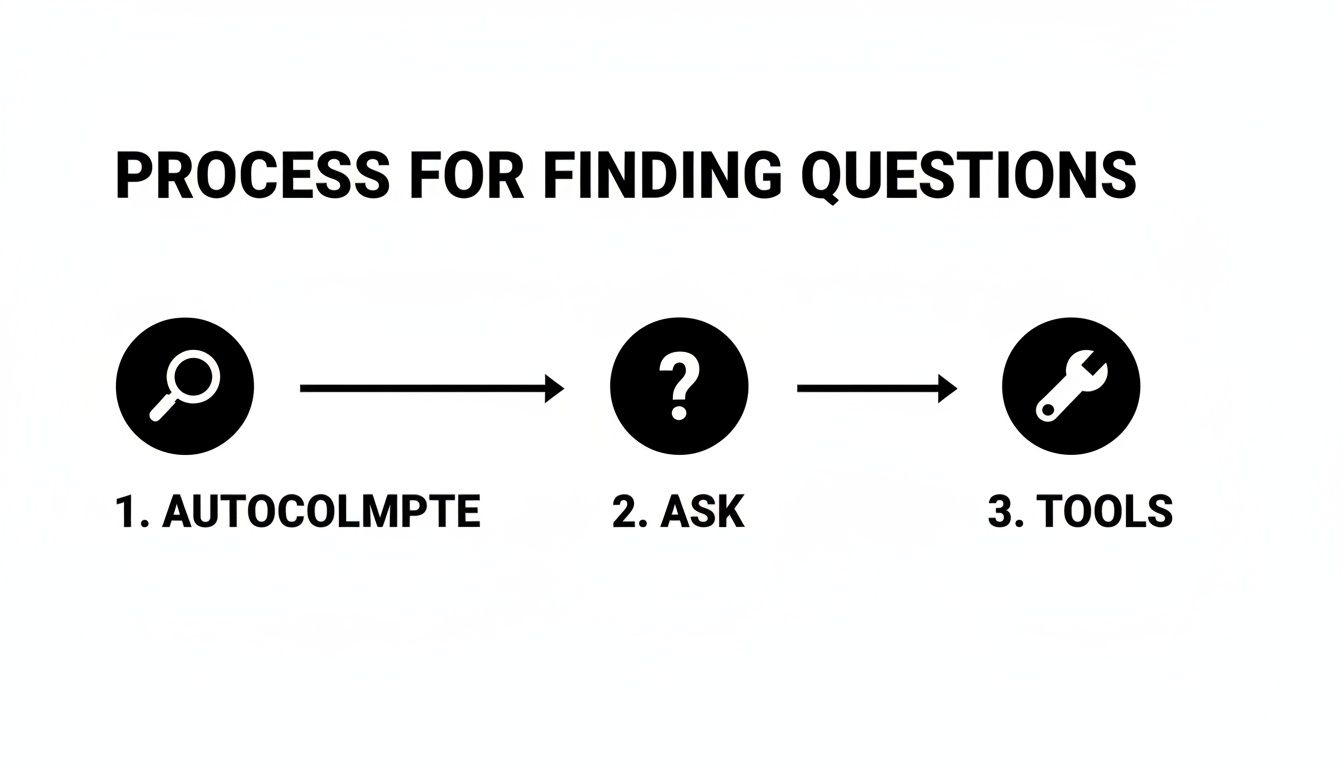
This little map helps you find the exact questions that can win you a featured snippet. It's all about finding what real people are typing into their phones and computers.
To help you get your page set up just right, here's a little cheat sheet. Think of it as your secret recipe for turning your words into snippet gold.
Featured Snippet Cheat Sheet
| Snippet Type | Good For | How to Do It |
|---|---|---|
| Paragraph | Answering "What is," "Why is," or "How does" questions. | Write a short, 40-60 word answer right under your heading. No extra fluff. |
| List | How-to guides, rankings, or "best of" lists. | Use real numbered or bulleted lists. Make each big step its own subheading. |
| Table | Comparing things like prices or features. | Use a simple table with clear labels. Make it easy to read and compare. |
Getting these right is the most important part of the game. Let's break down how to do each one.
The "Answer First" Trick for Paragraphs
This is the number one most important thing for winning paragraph snippets. You have to give away the answer right away. No long, boring intros.
Right under your heading, write a clean, simple answer to the question. This little paragraph needs to be between 40 and 60 words. Think of it as the perfect summary that Google can just copy and paste.
For example, if your heading is "What Is a Featured Snippet?", your very next sentence should be something like this:
"A featured snippet is a special box at the top of Google that gives a quick answer to a question. Google pulls it from a webpage and shows it above all the other results."
Short, sweet, and to the point. That's what Google loves.
Make Your Lists Clean and Simple
For any how-to guide or list, good organization is your best friend. Google loves when it can easily turn your content into a numbered or bulleted list. The trick is to use clear headings and simple lists.
Use your big subheadings (H2 or H3) to break your guide into steps. Then, under those headings, use actual numbered or bulleted lists to explain the details.
A winning guide looks like this:
- A clear H2 heading for the whole topic (like, "How to Bake a Chocolate Cake").
- H3 headings for each step (like, "Step 1: Mix the Dry Stuff," "Step 2: Add the Wet Stuff").
- Bullet points under each step for extra tips or ingredients.
This clean setup is like drawing a map for Google, telling it, "Hey, this is a super clear, step-by-step guide!" The easier you make it for the robots, the more likely they are to feature you.
Don’t make it complicated. Simple lists and clear headings are all you need. Forget fancy designs; simple is what wins.
Put Your Info into Tidy Tables
Do you have writing that compares different things, like phones or vacation spots? A table isn't just a good idea—it's your secret weapon for getting a table snippet.
Google loves to grab info from organized tables because they're super easy for people to read. Instead of writing long paragraphs comparing two things, just pop that info into a simple table.
For example, comparing two phones would look like this:
| What It Has | Phone A | Phone B |
|---|---|---|
| Screen Size | 6.1 inches | 6.7 inches |
| Battery Life | 12 hours | 15 hours |
| Camera | 12 MP | 48 MP |
This is a home run for both people and Google's robots. For years, this was the best way to get that top spot, which used to get almost 43% of all the clicks. Things have changed a bit, but the main idea is the same: being clear wins. You can read more about how the SEO world is adapting to new things like AI answers, but making your information easy to scan will always be a good idea.
Simple Tricks to Help Google Find Your Answers
Having a perfectly written answer is a huge step, but it’s only half the puzzle. You also need to help Google find your amazing answer in the first place. This is where a little bit of on-page SEO comes in, and it's way easier than it sounds.
Don't worry, we're not talking about confusing computer code. We're just making a few small changes that act like big, bright signs, pointing Google right to your best stuff.
Think of it like cleaning up a messy room. If toys and books are everywhere, it's hard to find your favorite teddy bear. But if everything is in its spot, you can grab it in a second. We’re just tidying up your webpage so Google can do the same.
Your Page Title Is a Giant Sign
Your page title—the words that show up in the little tab at the top of your web browser—is the most important clue you can give Google. It’s the very first thing Google reads to figure out what your page is all about.
So make it a good one! The best thing you can do is put the question you're answering right in the title. If you're trying to win the snippet for “how to tie a tie,” a great title would be something like “How to Tie a Tie: A Super Simple Guide.”
This tiny change makes a huge difference. It tells both Google and people, "Hey, the answer you're looking for is right here on this page!"
Use Subheadings as a Map
After the title, Google looks at your subheadings (your H2s and H3s) to understand how your page is organized. They're like chapters in a book, breaking up a big topic into smaller, bite-sized pieces.
Just like with your main title, you should put your target question in your most important subheading. Usually, this will be your first big H2 right after your intro.
So, after you say hello, your first big, bold heading should be the question itself. This creates a really clear path for Google. It sees the title, it sees the matching heading, and it thinks, "Okay, the answer must be right under this."
My Personal Tip: Don't just stop at one subheading. If your article answers other questions from the "People also ask" box, make each of those questions its own subheading too. This makes your page super organized, which Google loves.
This clean setup is a must-do. A study by Ahrefs found that 99% of all featured snippets come from pages that are already on the first page of Google. Being well-organized is a big reason they got there.
Don't Forget Your Pictures
Did you know that even your pictures can help you win a featured snippet? Sometimes Google will show a picture from the webpage right next to the answer, which really makes it pop.
You can help your chances by giving your pictures simple, clear names. Instead of uploading a photo called IMG_8439.jpg, change its name to describe what's in the picture.
For that article on tying a tie, a good file name would be:
how-to-tie-a-tie-step-1.jpgfinished-windsor-knot.jpgperson-adjusting-a-tie.jpg
This gives Google extra clues about your page. You should also fill out the "alt text" for every picture, which is just a short, written description of what the picture shows. It's one more easy way to help Google understand that your page is the best one for the job.
These little changes might not seem like a big deal by themselves, but when you put them all together, they send a powerful message. They shout to Google, “The best, most organized, and most helpful answer is right here!”
Common Snippet Mistakes to Stay Away From

Do you ever feel like you’re doing everything right, but you just can't get that featured snippet? It’s super frustrating. But the good news is, it's usually because of a few common mistakes that are pretty easy to fix.
Getting that top "position zero" spot is a game of small details. You could have the most amazing information, but if it's not set up the right way, Google will just skip right past it. Let's look at the biggest mistakes people make so you can avoid them.
Trying to Sound Too Smart
One of the biggest mistakes is using big words or trying to sound like a professor. We all want to seem like experts, but Google isn't looking for a science paper. It wants a fast, simple answer that anyone can understand.
Think about it from the searcher's point of view. They just want a quick answer, not a long story. If your answer is hidden in a giant paragraph full of confusing words, you've already lost.
Here’s a simple rule to remember: if a 10-year-old can't understand your answer in ten seconds, it's too complicated. Be direct. Be clear.
My Advice: Read your answer out loud. Does it sound simple and natural? If you trip over words or it sounds weird, it’s time to rewrite it. Simple is almost always better.
Just look at companies that sell computers or plan vacations—they figured this out a long time ago. They learned to give quick, easy-to-read answers, which helped them get tons of snippets. In fact, one study found the electronics industry got a snippet for 62% of their questions. To see how others have done it, you can explore the data on SEO in 2025.
Forgetting to Check Out the Competition
Another huge mistake is not looking at what other people are doing. You can't just write what you think is a good answer. You have to look at what Google already thinks is a good answer.
Go search for the question you want to answer and look at the page that already has the featured snippet. Don't copy them! But you should learn from what's working.
- What kind of snippet is it? Is it a paragraph, a numbered list, or a table?
- How long is their answer? Count the words. Is it shorter or longer than what you wrote?
- What kind of words do they use? Are they super simple or a little more detailed?
This is like getting a free peek at the teacher's answer key. Google is showing you exactly what kind of answer it likes for that question. Your job is to make something even better that follows the same basic rules.
Having a Messy Page
Last but not least, a messy page can ruin your chances. Even if you have the perfect answer, if your page is just one giant block of text with no headings, Google's robots will get confused and leave.
Think of your headings and subheadings (your H2s and H3s) as a map. They show Google where to go and point to the most important parts. Without them, your page is just a big mess of words.
Make sure you use:
- A clear page title that has the question in it.
- An H2 subheading that asks the exact same question.
- A short, simple answer right under that heading.
By avoiding these common mistakes, you make it much easier for Google to find your awesome content, understand it, and show it off to the world.
Common Questions About Featured Snippets
Even with a good plan, you probably still have a few questions floating around. Getting a featured snippet can sometimes feel like magic, but it's really not that confusing once you know a few more things.
Let's go over some of the most common questions people ask. I'll keep the answers short and sweet so you can get back to creating great stuff.
How Long Does It Take to Get a Featured Snippet?
This is the big one, right? The honest answer is: it depends. There's no set time. It could happen in a few days, or it might take a couple of months.
Think of it like planting a flower. If your page perfectly answers a brand-new question that not many people have written about, that flower can grow super fast. You might see a snippet in less than a week!
But for topics that lots of people have written about, Google needs more time. It has to find your page, read it, and then feel sure that your answer is the very best one. The trick is to be patient. Just keep making helpful, organized pages, and eventually, your hard work will pay off.
Do I Need to Be Number One to Get a Snippet?
Nope! And this is the best thing about featured snippets. You do not need to be the number one result to get the "position zero" spot.
This is what makes them such a cool shortcut. Most of the time, Google grabs snippets from pages that are anywhere on the first page—that means from position 1 all the way down to 10. I've seen pages that were 5th, 6th, or even 8th suddenly jump over everyone else to get that special box.
Why does this happen? Because Google is looking for the best answer, not just the page that ranks the highest. If your page gives a clearer, simpler, and better-organized answer than the pages above you, Google will often reward you with the snippet. It's your chance to cut the line.
So, don't feel bad if you're not already at the very top. Just focus on making an amazing answer, and you have a great shot.
Can I Lose a Featured Snippet?
Yes, sadly, you can. The top spot on Google is like a rented parking space, not one you own forever. And that goes for featured snippets too. They can disappear.
One day you have it, and the next it might be gone. This can happen for a few reasons:
- Someone else made a better answer. A competitor might have made their page even clearer or easier to read, and Google decided to feature them instead.
- Google changed its rules. Google is always making little changes. An update might make it think a different kind of answer is better for that question.
- People started searching differently. Sometimes, the way people look for things changes over time, and Google will change the snippet to match what people want now.
This is why you should keep an eye on your snippets. If you lose one, don't worry. Go see who has it now. Look at what they're doing differently and figure out how you can make your own page even better to win it back. It's an ongoing game.
Does Special Code Like Schema Markup Help?
This is a great question! The simple answer is that while special code like Schema markup isn't something you have to have, it can definitely help.
Think of Schema like leaving little sticky notes for Google on your webpage. It's a way to tell the search engine exactly what your stuff is about. For example, you can use it to say, "Hey Google, this part of my page is a recipe," or "This part is a question and answer."
This extra information makes it much easier for Google to understand your page quickly, which can give you a little boost over others who aren't using it. It’s a good thing to learn, but your main job should always be to write a fantastic, clear, and simple answer for a real person.
Ready to stop guessing and start getting seen? The strategies in this guide are a great start, but turning your expertise into the "best answer" across the web is our specialty. Authority Echo partners with you to build a system that makes you the obvious choice for search engines, AI assistants, and potential clients.
Get your free visibility audit today at https://www.authorityecho.com and see where you stand.